A new app to make libraries more accessible.//
Research Methods:
— Contextual Inquiry
— Interviewing
— Literature Review
Tools:
— Figma
— Adobe Photoshop
The Challenge: Designing A New Tool To Increase Library Accessibility
As gateways to information and culture, libraries have a vital role in the development of society. Nowadays, new information sources including web-based resources bring along a critical change in the role and the form of libraries.
Libraries are one of my favorite places since I was a high school student. As a person who was born and grew in a small city called Zonguldak, the only library that I’ve regularly visit and borrow books was the one at my high school. Regarding this, I felt a great excitement when I moved in a big city for my undergraduate education and learned that there are lots of libraries in there. After a short time, I’ve figured out that every library has their own catalogues, schedules and occupancy rate. Then, I thought that it would be so useful if there was an app which includes the information from every library in a city. This case study comes from that idea. I searched the literature and interviewed with other library users to create a design for a new (and imaginary) app called “The Library”.
So, the main question of this case is: How might we create a positive and accessible experience for library users?

—
1. DISCOVERY AND RESEARCH
I began the process with understanding real user needs. In order to find out this, I interviewed with individuals who regularly visit libraries. While interviewing with them, my main purposes were:
- Understanding the challenges they experience while visiting a library
- Discovering their expectations for future library visits.
I could conduct interviews only with a small group of participants. Emerging themes during the interviews can be seen below.
- Its difficult to foresee the libraries which have available place to sit.
- When there is a specific book that a person willing to find in a library, its a challenging issue for them to figure out which library have the book in their category.
- Participants want to know every library in their city.
- Participants want to find the nearest libraries easily.
- Libraries’ working hours should be more clear in the web sites.
In order to learn more about library users and their preferences, I reviewed scientific literature on the topic. In their article entitled “Improving Library Users’ Perceived Quality, Satisfaction and Loyalty: An Integrated Measurement and Management System”, Martensen and Grønholdt (2003) investigated the main components that effects library users’ satisfaction and loyalty by using structural equation model. Results can be seen in the table below:
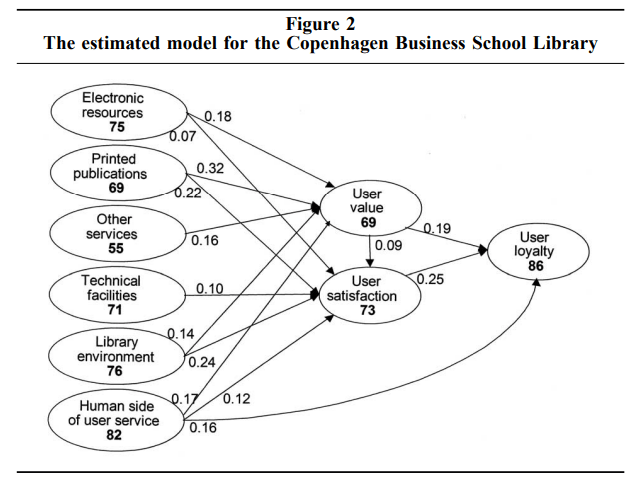
As seen from the analysis-table; human side of user service, electronic resources, library environment and technical facilities are some of the critical aspects which a library should involve for a better library user satisfaction. Additionally, Suarez (2007) have conducted a qualitative research with library users and listed some of the preferences of library users as:
- “Library study space was normally used constantly and always in demand
- Both quiet and group spaces were heavily used
- There seemed to be an “ebb and flow” to study space use; students worked individually but also joined groups, then went back to working individually from time-to-time.
- Study space was used by a wide cross-section of students but the group areas seemed to be used more by younger students
- Cell phones, laptops, personal sound devices (and possibly other electronic gadgets) were used extensively
- Students ate and drank frequently at the study areas
- The constitution of most groups appeared to be based on class assignments and/or friendships”
In the light of the literature and interviews, I decided to focus on two things: 1. Easy access to data of occupancy rates in libraries’ study spaces. 2. Opportunity to scan databases of all libraries in a city to find a book.
2. WIREFRAMING AND PROTOTYPING
I used sketching to brainstorm, and started to design the app with a paper prototype. I drew almost 40 different frames, then choose these 3. I have to note that a UX Researcher should conduct a usability test in this stage of design. But this case study is just for an imaginary-app, so I did not use this kind of techniques.
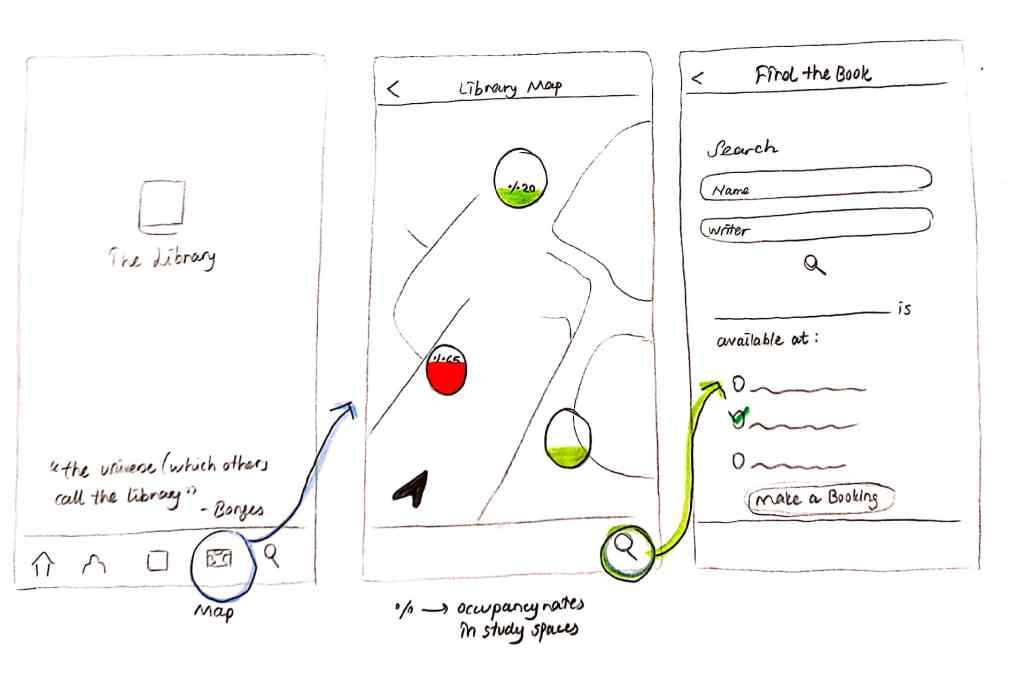
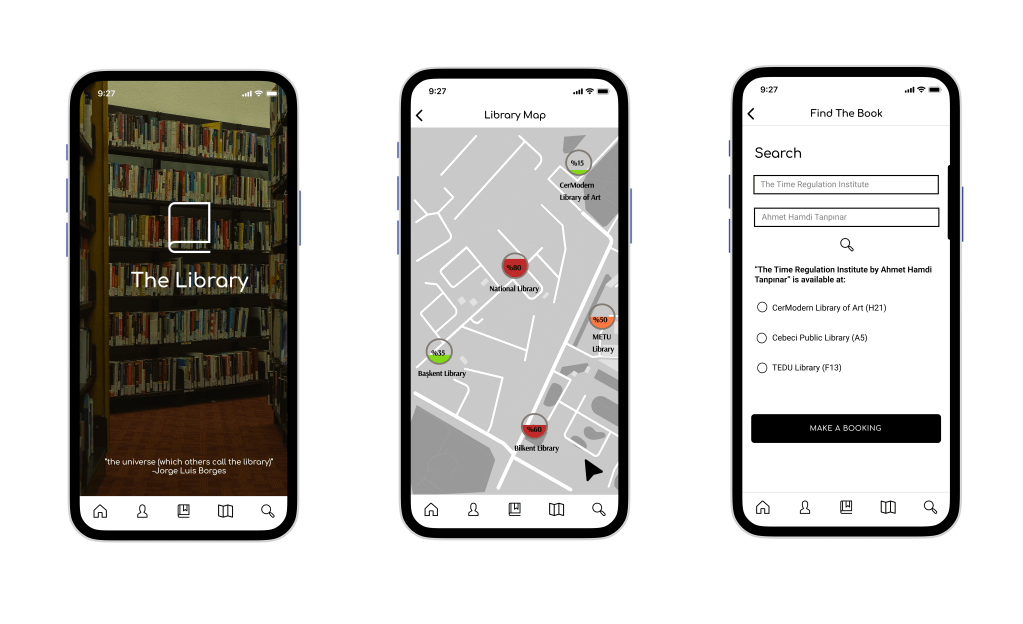
After wireframing, I created these prototypes via Figma. As seen in the second frame, users can see the occupancy rates of each library from the map. Also, they can search for a book by using the app which have databases from each libraries in a city.
 Sena Dökmeci